
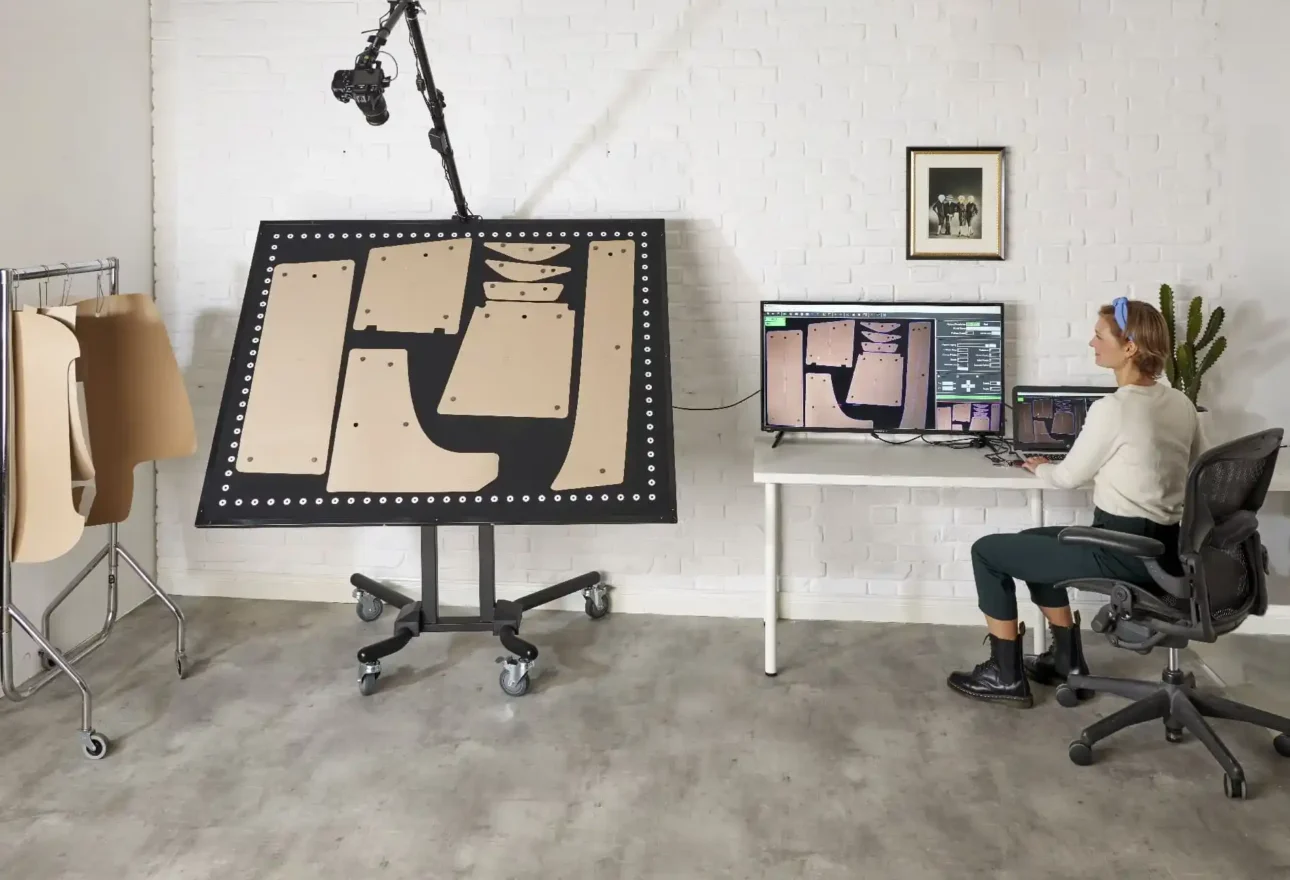
What Is a Camera Pattern Digitizing System?
A camera pattern digitizing system uses a high-resolution image and specialized software to convert the outlines and internal details of physical patterns into vector-based digital files.
Traditional table digitizing normally requires an operator to register points manually around the perimeter of each pattern. A camera-based system captures the pattern as an image and automatically interprets its geometry. This can make the digitizing process faster and less dependent on repetitive manual point entry.
The resulting digital pattern can be stored, edited, graded, marked, plotted, or prepared for compatible automated cutting equipment. Camera digitizing therefore serves as an important bridge between physical garment patterns and a connected CAD/CAM workflow.
What Is the V‑Shoot Camera Digitizing System?
V‑Shoot is a camera-based pattern digitizer offered by Velocity Plotters & Cutters. It is designed to convert physical patterns made from paper, cardboard, textiles, technical fabrics, and other materials into editable digital files.
The system uses a specially printed V‑Shoot board with reference circles positioned around its edges. The software reads these reference points to correct optical distortion and calculate the pattern at full scale. Patterns are held in position with magnetic buttons, eliminating the need to tape each piece to the digitizing surface.
V‑Shoot supports pattern export in widely used formats, including DXF, AAMA DXF, and PLT. Depending on the required workflow, its files can integrate with CAD and production platforms used in apparel, fashion, footwear, upholstery, automotive interiors, and technical-textile manufacturing.
How Does V‑Shoot Work?
The V‑Shoot garment-pattern digitizing workflow can be summarized in five steps:
- Place the physical patterns on the board. Arrange one or multiple garment pattern pieces on the magnetic V‑Shoot surface.
- Secure the pieces. Use magnetic buttons to keep the patterns flat and prevent movement during capture.
- Capture a high-resolution image. Use a compatible camera or supported mobile capture configuration.
- Allow the software to vectorize the patterns. V‑Shoot detects the outlines and pattern information, corrects optical distortion using the board’s reference circles, and creates digital geometry.
- Review, edit, and export. Inspect the result, make any necessary pattern adjustments, and export the selected pieces in a format compatible with the next stage of production.
V‑Shoot can export all patterns captured in an image or selected individual pieces. It can also combine patterns from multiple images into one file. Adobe Illustrator users can copy pattern geometry directly from V‑Shoot and paste it into Illustrator without first saving a separate file.
Why Pattern Digitizing Matters in Apparel Manufacturing
Many garment companies have years of valuable pattern knowledge stored only in physical form. Paper patterns may represent approved fits, production blocks, uniforms, costumes, private-label styles, discontinued collections, or frequently reordered products. These assets can be difficult to search, duplicate, modify, or share across teams and locations.
Converting physical patterns into digital files can help apparel businesses:
- Preserve legacy pattern libraries
- Reduce the risk of losing or damaging irreplaceable patterns
- Create searchable digital pattern archives
- Edit and correct patterns in CAD software
- Grade a base pattern into additional sizes
- Generate efficient markers for fabric utilization
- Plot replacement patterns when needed
- Transfer approved patterns between locations
- Prepare pattern data for compatible automated cutting systems
- Improve version control and pattern traceability
Digitizing does not replace skilled pattern making. Instead, it gives pattern makers a faster way to move physical work into a digital environment where it can be evaluated, refined, and reused.
Key Benefits of V‑Shoot for Apparel and Garment Production
Automatic Pattern Vectorization
V‑Shoot automatically converts captured pattern images into vector geometry. This reduces the need to manually click numerous points around every piece and can shorten the time required to enter established patterns into a CAD system.
Automatic Image Calibration
The software uses the reference circles printed on the board to compensate for factors such as camera distance, viewing angle, lighting, and image blur. Because calibration is handled for each image in the background, the camera does not always have to remain in one permanently fixed position.
Full-Scale Pattern Output
V‑Shoot is designed to calculate patterns at a 1:1 scale. According to Velocity’s current product information, boards under 200 cm provide accuracy within approximately one millimeter, while XL boards provide accuracy within approximately two millimeters. A 90 × 60 cm board or scanner-based capture may be used when a smaller pattern requires higher precision; Velocity states scanner-based accuracy can be below 0.5 mm for smaller pieces.
Accuracy depends on using the system correctly, capturing a suitable image, keeping patterns flat, and reviewing the digitized result before production.
Multiple Patterns in One Capture
Operators can arrange multiple pattern pieces on the board and digitize them from the same image. This can be especially useful when converting a complete garment style containing fronts, backs, sleeves, collars, facings, pockets, waistbands, and other components.
Support for Oversized Garment Patterns
V‑Shoot includes fractional or segmented digitizing capabilities for patterns that exceed a single capture area. V‑Shoot XL boards can also be customized for large pattern pieces and production environments with specialized size requirements.
Editable CAD-Ready Files
After digitizing, the operator can review and edit the pattern data. Depending on the intended workflow, this may include refining vector lines, working with notches and internal features, managing layers, removing unnecessary components, or preparing the pattern for grading, marker making, plotting, or cutting.
Flexible Installation Options
The V‑Shoot board can be configured for different workspaces. Standard systems may be wall-mounted or used with an adjustable stand. XL boards may be installed flat on a table or floor, mounted vertically on a wall, or positioned at an angle. The appropriate camera arrangement depends on board size, orientation, capture method, and available space.
V‑Shoot Applications in Apparel and Garment Manufacturing
Converting Legacy Paper Patterns
Apparel companies can digitize archived master patterns before age, handling, moisture, or physical damage makes them unreliable. Digital preservation also makes it easier to create controlled backups.
Moving From Manual to Digital Pattern Making
A business that still drafts patterns by hand can continue developing physical pieces and use V‑Shoot to transfer approved patterns into CAD. This provides a gradual path toward digital production without abandoning an established pattern-development method.
Creating Digital Base Blocks
Pattern makers can digitize trusted slopers or base blocks and use them as starting points for new styles, modifications, and grading inside compatible CAD software.
Supporting Samples and Product Development
Sample rooms can digitize pattern corrections, revised prototypes, draped pieces, or manually adjusted templates so that the approved version becomes part of the digital record.
Reproducing Uniforms and Specialty Garments
Uniform producers, costume departments, protective-apparel companies, and made-to-measure operations may need to preserve and reproduce established patterns over long periods. Digital files make repeat orders and controlled revisions easier to manage.
Connecting Patterns to Marker Making and Cutting
Once patterns have been digitized and reviewed in CAD, they can be graded, nested into markers, plotted on a Velocity marker plotter, or prepared for a compatible automatic cutting workflow. This helps connect pattern development with production planning.
File Formats and CAD Compatibility
V‑Shoot supports several formats used in apparel and industrial workflows:
| File format | Typical purpose |
|---|---|
|
DXF |
General CAD interchange and pattern editing |
|
AAMA DXF |
Apparel-industry pattern exchange, including structured pattern information |
|
PLT / HPGL |
Plotting and compatible production output |
|
SVG |
Vector exchange for compatible design workflows |
Velocity’s current V‑Shoot information lists compatibility with platforms including Gerber, Lectra, Optitex, Assyst, Gemini, Tukatech, AutoCAD, SolidWorks, Adobe Illustrator, and CorelDRAW, among others.
Compatibility should always be verified using the exact software version, export configuration, layer requirements, and downstream machine used by the customer. Before purchasing, send Velocity Plotters a representative physical pattern or sample digital file and describe the full workflow from capture through CAD, plotting, and cutting.
Standard V‑Shoot vs. V‑Shoot XL
The correct configuration depends primarily on pattern size, desired accuracy, available space, capture method, and production volume.
| Consideration | Standard V‑Shoot | V‑Shoot XL |
|---|---|---|
|
Best suited for |
Common garment patterns and compact design spaces |
Oversized patterns, large templates, and customized industrial installations |
|
Board configuration |
Standard magnetic capture board |
Customizable board up to the maximum dimensions offered by Velocity |
|
Placement |
Wall or adjustable stand configurations |
Table, floor, wall, angled, or other planned installations |
|
Camera arrangement |
Compatible camera or supported mobile capture, depending on configuration |
Camera selected and positioned for the board size and installation |
|
Stated accuracy |
Approximately within 1 mm for boards under 200 cm |
Approximately within 2 mm for XL boards |
|
Large-pattern workflow |
Segmented capture when necessary |
Larger capture area plus segmented options for oversized pieces |
Velocity states that V-Shoot XL can be customized up to 450 × 240 cm (approximately 14.8 × 7.9 feet, or 177 × 94 inches). Common XL board requests include 200 × 150 cm (79 × 59 inches), 240 × 150 cm (94 × 59 inches), and 300 × 150 cm (118 × 59 inches). Available black or white board options can provide contrast for different pattern colors.
Camera, Mobile Phone, and Scanner Capture
The essential V‑Shoot components are the software and the V‑Shoot board. A camera may be included or selected separately depending on the required setup.
If a camera is mounted above a horizontal board for automatic capture, it generally needs a tethering capability so it can communicate directly with the computer. Supported mobile capture can provide flexibility for compatible standard-board configurations. For large XL installations, camera positioning and computer connectivity should be planned specifically for the board size and workspace.
V‑Shoot can also process images acquired through a scanner. When a camera or mobile phone is used, the original V‑Shoot board is necessary because its printed reference circles allow the software to correct optical distortion and calculate accurate full-scale dimensions.
What to Evaluate Before Purchasing a Camera Digitizer
Before selecting a V‑Shoot configuration, answer the following questions:
- What are the dimensions of the smallest and largest patterns you need to digitize?
- How many pattern pieces or complete styles will you digitize each week?
- What level of accuracy does your application require?
- Are the patterns made from paper, cardboard, fabric, foam, or another material?
- What colors are the patterns, and which board color provides the best contrast?
- Which CAD software and version will receive the files?
- Which export format does the CAD system require?
- Will the finished patterns be graded, marked, plotted, or automatically cut?
- Do you prefer a wall-mounted, flat, angled, or movable installation?
- Is there enough camera distance and lighting for the proposed board size?
- Will you use a compatible camera, mobile device, or scanner?
- Who will review and approve the digitized pattern before production?
Recommended Quality-Control Workflow
Every digitized pattern should be verified before it is released to production. A practical quality-control process includes:
- Keep the physical pattern flat and fully visible.
- Confirm that all reference circles required for calibration are visible.
- Capture the image with adequate, even lighting.
- Review the detected perimeter, corners, curves, holes, and notches.
- Confirm that internal markings and grainlines are present as required.
- Verify the exported unit of measurement and 1:1 scale.
- Measure several known dimensions in the receiving CAD system.
- Plot or cut a test piece before approving a new production pattern.
- Save the approved file using a consistent style number, size, revision, and date.
- Back up the approved pattern library in more than one secure location.
This review protects the production process and creates a reliable digital record.
V‑Shoot Warranty, Support, and Financing
Velocity’s current V‑Shoot product page lists a one-year parts warranty and three months of remote technical support through video conferencing, telephone, or remote desktop assistance. Financing is available through TimePayment, subject to approval and current program terms.
Customers should request a written proposal identifying the selected board, software license, camera or capture equipment, computer requirements, freight, installation method, training, warranty, support, and any optional services.
Frequently Asked Questions
What is the V‑Shoot Camera Digitizing System?
V‑Shoot is a camera-based system that converts physical garment and industrial patterns into editable vector files for compatible CAD, plotting, and cutting workflows.
How does V‑Shoot digitize a garment pattern?
The operator places the pattern on a magnetic reference board, captures an image, and uses V‑Shoot software to correct optical distortion, identify the pattern geometry, vectorize it, and export the result.
Which files can V‑Shoot export?
V‑Shoot supports formats including DXF, AAMA DXF, PLT or HPGL, and SVG for compatible workflows. Confirm the exact format and configuration required by your receiving software.
Is V‑Shoot compatible with apparel CAD software?
Yes. Velocity lists compatibility with leading systems such as Gerber, Lectra, Optitex, Assyst, Gemini, and Tukatech, as well as general design platforms. Compatibility should be confirmed for the customer’s exact software version and workflow.
How accurate is V‑Shoot?
Velocity states that V-Shoot boards under 200 cm (79 inches) provide accuracy within approximately one millimeter (0.039 inches), XL boards within approximately two millimeters (0.079 inches), and scanner-acquired images below 0.5 mm (0.020 inches) for suitable smaller patterns. Actual results depend on correct capture, pattern condition, configuration, and validation.
Can V‑Shoot digitize large garment patterns?
Yes. Oversized pieces can be processed through segmented digitizing, and V‑Shoot XL provides customizable board sizes for large patterns and industrial templates.
Can V‑Shoot digitize several patterns at once?
Yes. Multiple visible pieces can be captured and vectorized from one image, then exported together or individually.
Does V‑Shoot require repeated manual calibration?
No traditional pre-installation calibration is required. The software uses the board’s printed reference circles to calibrate each image and correct for capture conditions.
Can V‑Shoot run on a Mac?
Velocity states that V‑Shoot can run on macOS through a Windows virtual machine. Customers should confirm the current computer configuration and support requirements before purchasing.
Can I use V‑Shoot without its board?
Only when the source image is acquired through a scanner. Camera and mobile-phone capture require the V‑Shoot board so the software can use its reference circles for distortion correction and full-scale measurement.
What materials can V‑Shoot digitize?
V‑Shoot can digitize patterns made from paper, cardboard, textiles, technical fabrics, and other suitable materials, provided the pattern edges can be captured clearly against the board.
Is V‑Shoot only for apparel manufacturing?
No. It is also applicable to footwear, furniture and upholstery, automotive interiors, marine products, technical textiles, PPE, and other industries that convert physical templates into digital production files.
Final Recommendation
The V‑Shoot Camera Digitizing System is a strong option for apparel and garment companies that need to convert physical pattern libraries into editable CAD data without relying on manual point-by-point entry. Its automatic vectorization, image calibration, magnetic pattern placement, multiple export formats, and standard or XL board configurations make it adaptable to design rooms, sample departments, fashion schools, uniform producers, and industrial garment facilities.
The correct system should be selected according to pattern size, accuracy requirements, weekly digitizing volume, CAD compatibility, capture method, and workspace. Before ordering, test a representative pattern and confirm how the exported file will move through CAD, grading, marker making, plotting, and cutting.
Request a V‑Shoot Demonstration
To receive a personalized V‑Shoot recommendation, send Velocity Plotters the dimensions and photographs of your patterns, the approximate number of pieces you need to digitize, your CAD software, preferred export format, and photographs of the proposed installation area.
Contact Velocity Plotters & Cutters at 833-275-6888, email info@velocityplotters.com, or visit www.VelocityPlotters.com to request information, a demonstration, or a formal quotation.

 EN_US
EN_US  ES
ES