
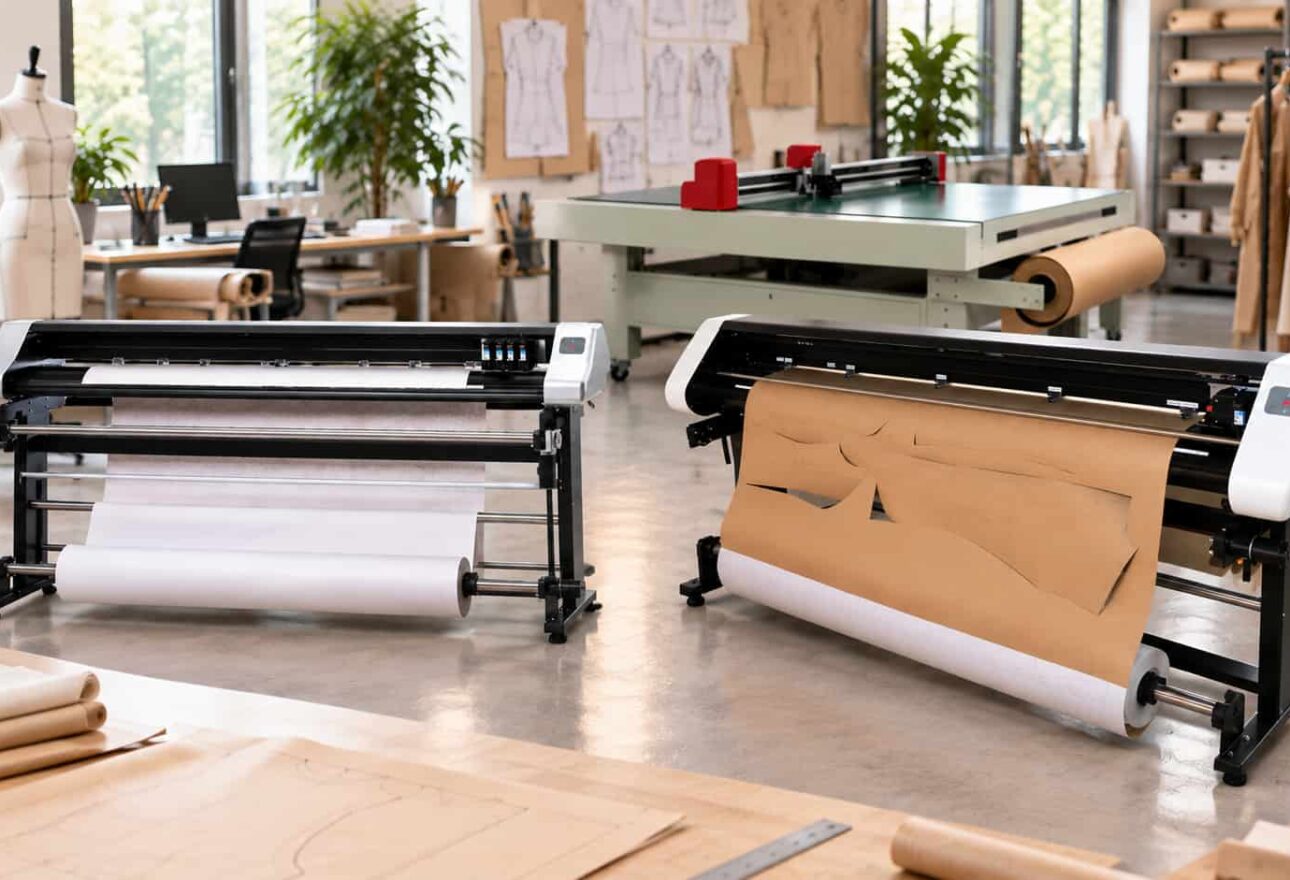
¿Qué es un plotter de ropa?
Un plotter de ropa es un sistema industrial de plotado de gran formato utilizado para imprimir patrones de ropa a escala completa y marcadores anidados generados por software CAD de ropa.
A diferencia de las impresoras convencionales para oficinas o diseño gráfico, las impresoras para ropa están diseñadas teniendo en cuenta el flujo de trabajo que implica la creación de patrones, la clasificación, la fabricación de marcadores, el desarrollo de muestras y la producción de cortes.
Algunas aplicaciones típicas incluyen:
– Fabricación de ropa y prendas de vestir
– Diseño de moda
– Diseño de patrones
– Habitaciones de muestra
– Operaciones de corte y cosido
– Fabricación uniforme
– Ropa deportiva
– Ropa de trabajo
– Productos técnicos confeccionados
– Costura a contrato
– Fabricación textil
Dependiendo de la aplicación, los fabricantes pueden necesitar un plotter de patrones, plotter de marcadores, plotter/cortador o sistema automatizado de corte de telas.
¿Qué debe buscarse en un plotter de ropa?
No existe una configuración de máquina única que sea ideal para todos los fabricantes de ropa. El plotter más adecuado es el que se ajuste correctamente a los requisitos de producción de la empresa.
Aquí hay algunos de los factores más importantes a considerar.
1. Ancho de trazado
Una de las primeras preguntas que se debe hacer es:
¿Cuál es el archivo de marcador o patrón más ancho que necesitamos imprimir con frecuencia?
Comprar un plotter demasiado estrecho puede restringir la producción. Al mismo tiempo, comprar una anchura sustancialmente mayor de la que requiere su operación podría no ofrecer un beneficio significativo.
Las anchuras comunes de trazado de marcadores industriales son aproximadamente:
66 pulgadas y 72 pulgadas
Para las empresas cuyos marcadores se encuentren dentro de aproximadamente 66 pulgadas, un sistema de trazado de 66 pulgadas puede ser una opción eficiente.
Las operaciones que producen marcadores más amplios deberían considerar un sistema de 72 pulgadas.
Siempre evalúe la anchura máxima real de la trazada, en lugar de la simple anchura del papel que pueda ser cargado físicamente en la máquina.
2. Volumen de producción y velocidad de trazado
Un pequeño estudio de moda que produce un número limitado de marcadores cada semana tiene requisitos muy diferentes a los de un fabricante de ropa de gran volumen que opera las 24 horas del día.
Velocity ofrece configuraciones diseñadas para diferentes requisitos de producción.
El Vector One utiliza un único cabezal de trazado y está diseñado para empresas que requieren trazado industrial con marcadores sin los requisitos de producción de un sistema multidecuador de mayor velocidad.
El Vector Two incorpora dos cabezales de trazado para aumentar la productividad de la trazado y es más adecuado para operaciones que producen grandes cantidades de marcadores.
En entornos de producción más intensiva, una configuración de cuatro cabezales puede proporcionar una capacidad adicional de trazado.
La pregunta importante no es simplemente:
“¿Cuál es el plotter más rápido?”
La pregunta más importante es:
“¿Cuánto espacio de planificación realmente necesita mi empresa?”
Seleccionar el equipo en función del volumen real de producción puede evitar tanto la subutilización como las desproporcionadas inversiones de capital.
3. Compatibilidad con CAD y archivos
La compatibilidad con CAD debe evaluarse antes de comprar cualquier plotter de ropa.
Los fabricantes de ropa suelen trabajar con sistemas y formatos de archivo asociados a plataformas como Gerber AccuMark, Lectra, Optitex, Tukatech, StyleCAD, PAD System, VetiGraph, AutoCAD y otros entornos CAD/CAM.
Los formatos de programación comunes pueden incluir:
– PLT
– HPGL
– HPG
Otros flujos de trabajo pueden proceder de:
– DXF
– AAMA DXF
– DWG
Cuando un sistema CAD no genera directamente el formato de trazado requerido por la máquina, el software de conversión puede convertirse en parte del flujo de trabajo.
EasyPlot de Velocity La solución, por ejemplo, se puede utilizar en flujos de trabajo en los que archivos CAD como DXF deben convertirse en un formato compatible con la impresión.
Antes de comprar cualquier plotter, los fabricantes deben confirmar el flujo de trabajo completo:
Software CAD → Archivo exportado → Conversión, si es necesario → Plotter
No se debe asumir la compatibilidad simplemente porque ambos sistemas admitan un formato con la misma extensión. Siempre se recomienda probar archivos de producción representativos antes de la implementación.
4. Requisitos de la documentación
La selección del papel afecta a la fiabilidad de la impresión, al manejo y al coste de funcionamiento.
Los plotters de etiquetas para ropa suelen utilizar papel de gran formato o papel especial para etiquetas.
Si bien el papel más ligero puede ser utilizable en algunas aplicaciones, el papel de unión más grueso ofrece una mayor durabilidad y puede reducir el riesgo de rasgado durante el manejo.
Los fabricantes deberían evaluar:
– Peso del papel
– Ancho de la rodilla
– Diámetro del núcleo
– Longitud del rollo
– Disponibilidad de papel
– Costo por rollo
– Requisitos de manejo
– Requisitos de aceptación
El papel es un gasto operativo recurrente, por lo que debería tenerse en cuenta al calcular el coste total de propiedad.
5. Conectividad y flujo de trabajo
Los entornos de producción de ropa moderna suelen necesitar múltiples estaciones de trabajo para acceder al mismo equipo de trazado.
Dependiendo del modelo y la configuración, la conectividad a la red puede permitir que el plotter se integre en el flujo de trabajo de producción en lugar de que sea necesario transferir manualmente los archivos de un ordenador a otro.
Antes de comprar, determine si su empresa requiere:
– Conectividad USB
– Conectividad LAN/red
– Máquinas de trabajo CAD múltiples
– Estación de trabajo dedicada para plotter
– Soporte técnico remoto
– Software de conversión de archivos
Un flujo de trabajo bien planificado puede ser tan importante como el propio hardware.
Los mejores plotters de velocidad para la fabricación de ropa en 2026
Las diferentes operaciones de confección requieren equipos específicos. Los siguientes sistemas de Velocity están diseñados para satisfacer necesidades de producción específicas.
Velocidad Vector Serie 1600 — Ideal para trazado de puntos de hasta 66 pulgadas
Para los fabricantes de ropa cuya producción no supere aproximadamente 66 pulgadas de anchura de trazado, la serie Velocity Vector 1600 ofrece una solución industrial para trazado de marcas sin necesidad de la anchura adicional de una máquina de 72 pulgadas.
Las configuraciones incluyen:
Vector One 1600
Configuración de una sola cabeza para requisitos de trazado más bajos o medios.
Vector Two 1600
Configuración de dos cabezales para empresas que requieren una mayor productividad en la impresión.
La configuración adecuada depende principalmente del volumen de producción y no solo de la anchura.
Más indicado para:
– Fabricantes de ropa
– Empresas de moda
– Operaciones de corte y cosido
– Departamentos de diseño de patrones
– Habitaciones de muestra
– Fabricantes de uniformes
– Instalaciones de costura por contrato
– Empresas que producen marcadores de hasta 66 pulgadas de ancho
Velocidad Vector Serie 1800 — La mejor para trazado de puntos de hasta 72 pulgadas
Los fabricantes que necesiten una anchura de trazado adicional deberían considerar la Velocidad Vector serie 1800.
Con una capacidad de trazado de hasta aproximadamente 72 pulgadas, el Vector 1800 está diseñado para marcares de producción más amplios y para empresas que desean una capacidad de marcado adicional.
Dependiendo de los requisitos de producción, las configuraciones pueden incluir opciones con una o varias cabezas.
Más indicado para:
– Fabricantes de ropa que producen marcadores más amplios
– Instalaciones de producción en gran escala
– Departamentos de diseño de patrones grandes
– Operaciones textiles industriales
– Empresas que requieren una anchura de trazado de hasta aproximadamente 72 pulgadas
La decisión entre un Vector 1600 y un Vector 1800 debería comenzar por una simple medición:
¿Cuál es el marcador más ancho que realmente produce su empresa?
Velocity Tecnica One — Ideal para requisitos de fabricación de patrones más pequeños
No todas las empresas de ropa necesitan un plotter industrial de 66 pulgadas o 72 pulgadas.
Los diseñadores de moda, los programas educativos, los diseñadores de patrones, las salas de muestras y las empresas de confección más pequeñas pueden trabajar principalmente con piezas de patrón individuales en lugar de con grandes marcadores de producción interconectados.
Para estas aplicaciones, una solución de trazado de patrones de formato más pequeño, como la Velocity Tecnica One Podría ser más apropiado.
En lugar de comprar equipos únicamente en función de la anchura máxima, las empresas más pequeñas deberían evaluar las dimensiones reales de sus patrones y el volumen de planchado semanal.
Velocidad Futura: plotter y cortador de patrones — ideal cuando se necesita tanto el corte como la impresión de patrones
Algunas empresas de ropa necesitan más que la impresión.
Los departamentos de diseño de patrones pueden necesitar producir piezas de patrón físicas que posteriormente deberán ser cortadas en papel.
Para estos flujos de trabajo, un máquina de corte y dibujo de patrones Se pueden combinar las funciones de trazado y corte dentro de la misma plataforma de equipos.
El cortador de patrones Velocidad Futura está diseñado para aplicaciones que requieren ambas funciones.
Esto puede ser particularmente útil para:
– Departamentos de diseño de patrones
– Desarrollo de muestras
– Diseño de moda
– Modificación del patrón
– Producción de patrones de corto plazo
– Departamentos de desarrollo
Es importante distinguir entre un Máquina de corte y modelado de patrones en papel de un sistema automático de corte de telas. Realizan diferentes funciones de producción.
¿Qué tal cortar la tela automáticamente?
Un plotter de marcadores imprime el marcador que guía el proceso de corte.
Un cortador automático va mucho más allá al cortar el propio material.
Los fabricantes de ropa que buscan automatizar la corte de una sola capa deberían evaluar equipos como el Velocity ProCut X Single-Ply Cutter en lugar de un plotter de marcadores convencional.
Esto crea un flujo de trabajo de producción digital más amplio:
Patrón CAD → Marcador/Nesting → Plotado o archivo digital → Corte automatizado → Costura/Montaje
El nivel adecuado de automatización depende del volumen de producción, los materiales, los costos laborales, los requisitos de rendimiento y la rentabilidad de la inversión.
Plotter de ropa de 66 pulgadas vs. de 72 pulgadas: ¿Qué comprar?
Esta es una de las decisiones más comunes que enfrentan los fabricantes de ropa.
Elige una Plotter de 66 pulgadas cuando los marcadores de producción permanezcan consistentemente dentro de esa anchura de trazado y no haya ninguna necesidad previsible de marcadores más amplios.
Considere una Plotter de 72 pulgadas cuando produzcas regularmente marcadores más anchos o necesites una mayor capacidad de anchura para futuras aplicaciones.
No tome la decisión basándose únicamente en la anchura del rollo de papel.
La especificación crítica es la del equipo. La anchura máxima de trazado utilizable.
Plotter de una cabeza vs. plotter de múltiples cabezales
La siguiente consideración importante es la velocidad de producción.
Generalmente adecuado para:
– Volumen de planificación inferior
– Fabricantes más pequeños
– Habitaciones de muestra
– Departamentos de desarrollo
– Empresas que producen un número limitado de marcadores cada semana
Generalmente adecuado para:
– Volumen de planificación de medios a superiores
– Entornos de producción
– Empresas que requieren una producción de marcadores más rápida
– Máx. operadores CAD que comparten la capacidad de trazado
Potencialmente adecuado para:
– Producción en gran escala
– Instalaciones donde la eficiencia de la producción es fundamental
– Operaciones que producen un volumen significativo de marcadores
La configuración más cara o más rápida no siempre es la mejor opción.
El objetivo debería ser adquirir la capacidad productiva suficiente para satisfacer las necesidades actuales, al tiempo que se permite un margen razonable de crecimiento.
Compatibilidad de Windows 11 con los equipos
La compatibilidad con el sistema operativo debe comprobarse antes de comprar equipos industriales.
Los flujos de trabajo de trazado de velocidad pueden soportar entornos de producción basados en Windows, incluidos sistemas Windows 11 configurados adecuadamente, dependiendo de la configuración de software y hardware.
Las empresas que utilicen computadoras Apple Mac deben evaluar cuidadosamente el flujo de trabajo completo antes de realizar la compra.
Si se ejecuta un entorno CAD en macOS, un ordenador dedicado con Windows o una estación de trabajo Windows en red pueden ofrecer a veces un entorno de producción más sencillo que la utilización de la virtualización.
Siempre verifique la computadora, el software CAD, el software de conversión, los controladores y la configuración del plotter antes de su implementación.
¿Debe un plotter de ropa necesitar un contrato de servicio obligatorio?
Los requisitos de servicio pueden afectar significativamente el costo a largo plazo del equipo industrial.
Al comparar los plotters, los compradores deberían preguntar:
– ¿Es obligatorio un contrato de servicio anual?
– ¿Qué sucede cuando expira la garantía?
– ¿Puedo comprar piezas de repuesto por separado?
– ¿Es posible obtener soporte técnico sin un contrato anual?
– ¿Las actualizaciones de software son obligatorias?
– ¿El cliente es el propietario del equipo?
– ¿Qué licencias de software están incluidas?
– ¿Cuáles son los costos del soporte técnico postventa?
En Velocity Plotters & Cutters, Los acuerdos de servicio no están diseñados para ser obligatorios simplemente porque un cliente tenga una máquina.
Los clientes pueden evaluar los acuerdos de soporte y servicio opcionales en función de sus necesidades operativas.
Esta distinción debe tenerse en cuenta al comparar el costo total de propiedad de los sistemas de trazado industrial más competitivos.
¿Cuánto cuesta un plotter de ropa?
El precio depende de varios factores, entre los que se incluyen:
– Anchura de la trama
– Número de cabezales de trazado
– Capacidad de planificar versus la de realizar cortes/tallados
– Requisitos del software
– Destino del envío
– Requisitos de instalación
– Formación
– Accesorios
– Configuración de garantía y soporte
Por esta razón, los fabricantes deberían comparar más que el precio inicial del equipo.
Una comparación más adecuada sería:
Precio de compra + Software + Instalación + Flete + Consumibles + Mantenimiento + Soporte + Costos de servicio esperados = Costo total de propiedad
Una máquina con un precio de compra más bajo no es necesariamente menos costosa en cinco o diez años.
De la misma manera, un equipo más caro no significa automáticamente que sea una mejor inversión.
Preguntas a preguntar antes de comprar un plotter de ropa
Antes de solicitar una cotización, responde a estas preguntas:
- ¿Cuál es la anchura máxima de nuestros marcadores?
- ¿Cuántos marcadores traemos al día o a la semana?
- ¿Qué software CAD utilizamos?
- ¿Qué formatos de archivo exporta nuestro sistema CAD?
- ¿Necesitamos solo planificar o planificar y cortar también?
- ¿Queremos finalmente un corte automático de la tela?
- ¿Qué tipo y peso de papel actualmente utilizamos?
- ¿Necesitamos conectividad de red?
- ¿Cuántos usuarios enviarán archivos al plotter?
- ¿Qué nivel de soporte técnico necesitamos?
- ¿Qué garantía está incluida?
- ¿Es obligatorio un contrato de servicio anual?
- ¿Los recambios están disponibles?
- ¿Cuáles son los costos operativos anuales esperados?
- ¿Prevemos necesitar una mayor anchura o una mayor capacidad de producción en el futuro?
Responder a estas preguntas antes de seleccionar un modelo puede evitar un mal ajuste costoso entre el equipo y los requisitos reales de la producción.
Preguntas Frecuentes
¿Cuál es el plotter más adecuado para la fabricación de ropa?
No existe una plotter ideal para todos los fabricantes de ropa. La máquina adecuada depende de la anchura de la impresión, el volumen de los marcadores, el flujo de trabajo CAD, los requisitos de papel, la velocidad de producción, los requisitos de soporte y el presupuesto.
Para operaciones que requieran una anchura de trazado de marcador de hasta aproximadamente 66 pulgadas, la serie Velocity Vector 1600 es una opción a considerar. Las empresas que requieran hasta aproximadamente 72 pulgadas deberían evaluar la serie Velocity Vector 1800.
¿Qué plotter de tamaño necesito para los marcadores de ropa?
Medir los marcadores más anchos que actualmente produce su empresa y considerar los requisitos futuros realistas.
Si la anchura máxima de la marca permanece dentro de aproximadamente 66 pulgadas, un sistema de trazado de 66 pulgadas puede ser suficiente. Aplicaciones más amplias pueden requerir un sistema de 72 pulgadas.
¿Puede un plotter de ropa imprimir archivos DXF?
El DXF es principalmente un formato de intercambio de CAD en lugar de un lenguaje de programación nativo para muchos plotters industriales.
Un flujo de trabajo común es:
DXF → Software de conversión → PLT/HPGL → Plotter
Velocity EasyPlot se puede incorporar a flujos de trabajo que requieren la conversión de archivos. La compatibilidad siempre debe verificarse utilizando archivos de producción representativos.
¿Cuál es la diferencia entre un plotter de patrones y un plotter de marcadores?
Un plotter de patrones se utiliza comúnmente para piezas individuales a escala completa, mientras que un plotter de marcadores está diseñado para imprimir marcadores de producción anidados más amplios que contienen múltiples piezas de patrón dispuestas para la utilización del material.
El sistema correcto depende de si la operación se centra principalmente en el desarrollo de patrones individuales o en la producción de marcadores para la corte de producción.
¿Necesito un plotter/cortador?
Si solo necesitas imprimir marcadores, probablemente no.
Si el departamento de patrones de la empresa necesita imprimir patrones individuales en papel y cortarlos automáticamente, un plotter/cortador de patrones puede mejorar el flujo de trabajo.
Si el objetivo es cortar la tela automáticamente, debería evaluarse un sistema de corte automatizado en su lugar.
¿Qué velocímetro es el adecuado para tu negocio de ropa?
Un punto de partida simplificado es:
| Requisitos de producción | Velocity Solution |
|---|---|
|
Plotación de patrones individuales más pequeños |
Tecnica One |
|
Marcador de hasta 66 pulgadas |
Vector 1600 |
|
Marcador de hasta 72 pulgadas |
Vector 1800 |
|
Mayor productividad en la elaboración de gráficos de marcadores |
Vector Two / configuración de múltiples cabezales |
|
Graficación de marcadores de gran volumen |
Configuración Vector Four cuando corresponda |
|
Plotado de patrones de papel + corte |
Máquina de corte de patrones Futura |
|
Corte automático de material de un solo capa |
ProCut X |
|
Digitalización de patrones |
V-Shoot |
|
Conversión de CAD a archivo |
EasyPlot |
La selección final siempre debe basarse en los requisitos de producción reales del fabricante.
Recomendación final
Lo mejor plotter de ropa El año 2026 no tiene por qué ser necesariamente la máquina más amplia, rápida o cara.
Es el plotter que mejor se adapta a tus necesidades:
Ancho del marcador + Volumen de producción + Flujo de trabajo CAD + Velocidad requerida + Requisitos de soporte + Presupuesto + Crecimiento futuro
Para un departamento de diseño de patrones pequeño, esto puede significar un plotter de patrones compacto.
Para un fabricante de ropa que produce marcadores de hasta 66 pulgadas, un Velocidad Vector 1600 Puede ser una solución adecuada.
Para marcadores más amplios, una Velocidad Vector 1800 puede proporcionar la capacidad adicional necesaria.
Para las empresas que necesitan que los patrones físicos en papel se puedan trazar y cortar al mismo tiempo, un Velocidad Futura Plotter Cutter puede proporcionar un flujo de trabajo mejor.
Y los fabricantes que se encaminan hacia la automatización del corte de telas deberían evaluar un sistema específico como el Velocity ProCut X.
La clave no consiste en comprar más equipo de lo necesario —ni en descubrir después de la instalación que se compró demasiado poco.
Habla con los cortadores y planificadores de Velocity
Antes de recomendar una máquina, Velocity puede evaluar su flujo de trabajo de producción actual.
Esté preparado para proporcionar:
– Ancho máximo del marcador
– Software CAD
– Formato de archivo típico
– Número aproximado de marcadores producidos por semana
– Tipo de papel
– Equipo de trazado actual, si corresponde
– Destino del envío
Sobre la base de estos requisitos, se puede identificar la configuración del plotter adecuada antes de preparar una cotización formal.
Velocity Plotters & Cutters
Plotters de patrones industriales • Plotters de marcadores • Cortadores de plotters de patrones • Sistemas de corte automatizados • Digitalización de patrones • Soluciones CAD/CAM
¿Te ha gustado el artículo? Síguenos para obtener más información y actualizaciones.

 ES
ES  EN_US
EN_US