

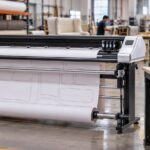
Both the Velocity Vector 1600 y Velocity Vector 1800 are designed for professional marker plotting in apparel, furniture, upholstery, automotive interiors, marine canvas, technical textiles, defense manufacturing, and other sewn-product industries. The principal difference is plotting width: the Vector 1600 plots up to 66 inches wide, while the Vector 1800 plots up to 72 inches wide.
So, which one does your operation need? Let us compare them.
66-Inch vs. 72-Inch Marker Plotter Comparison
| Consideration | 66-Inch Vector 1600 | 72-Inch Vector 1800 |
|---|---|---|
|
Maximum printable plotting width |
Up to 66 inches |
Up to 72 inches |
|
Recommended paper widths |
60, 63, and 66 inches |
60, 63, 66, 70, 72 inches |
|
Best suited for |
Operations whose markers remain within 66 inches |
Operations that regularly use markers wider than 66 inches or want additional flexibility |
|
Floor-space requirement |
More compact |
Slightly more room required |
|
Growth capacity |
Strong fit for established workflows up to 66 inches |
Better allowance for wider future applications |
La Velocity Vector 1600 is the practical choice for markers up to 66 inches. The Velocity Vector 1800 is the better choice for markers wider than 66 inches or companies that need the flexibility to plot up to 72 inches.
The most important measurement is the width of the marker file you need to print. A 72-inch roll of material does not automatically mean that you need a 72-inch printable area. If your usable fabric width and marker files never exceed 66 inches, the Vector 1600 may be the more practical choice. If your markers regularly exceed 66 inches, the Vector 1800 provides the necessary additional capacity.
When a 66-Inch Marker Plotter Is the Right Choice
La Velocity Vector 1600 is a strong choice for companies that typically work with 60-, 63-, or 66-inch marker paper. It can serve a wide range of apparel, upholstery, furniture, marine, and industrial-fabric applications without taking up more production space than necessary.
- A 66-inch plotter may be the right fit when:
- Your widest completed marker is 66 inches or less.
- Most of your fabric and paper workflows use widths of 60 to 66 inches.
- You want to control equipment and paper costs.
- Production-floor space is limited.
- You do not anticipate moving into wider materials in the near future.
For many manufacturers, 66 inches provides an excellent balance of usable width, productivity, and value. However, it is important to measure the actual marker—not merely rely on the advertised width of the fabric roll. Selvage, margins, shrinkage allowances, and production practices may reduce the usable width.
Who typically benefits from a 66-inch plotter?
A 66-inch industrial marker plotter is commonly suitable for apparel manufacturers, fashion schools, sample rooms, upholstery shops, marine-canvas businesses, furniture manufacturers, and sewn-product companies whose nested markers remain within a 66-inch printable width.
When a 72-Inch Marker Plotter Is the Better Investment
La Velocity Vector 1800 offers up to 72 inches of plotting width and supports a broader selection of paper widths, including 60, 63, 66, 70, and 72 inches. That additional six inches can be valuable for manufacturers working with wider fabric, larger components, or varied contracts.
- A 72-inch plotter may be the better choice when:
- Your marker files sometimes exceed 66 inches.
- You regularly use 70- or 72-inch marker paper.
- You work with large upholstery, furniture, marine, automotive, defense, or industrial-textile patterns.
- Your customers use different fabric widths.
- You expect your applications or production capacity to expand.
- You want greater flexibility without replacing the plotter later.
The extra width does not automatically make every marker more efficient. Its real value is flexibility. If even a small but important portion of your work requires more than 66 inches, a 72-inch model can prevent the need to resize, split, rotate, or otherwise modify markers to fit a narrower plotting area.
Who typically benefits from a 72-inch plotter?
A 72-inch industrial marker plotter is often a better fit for manufacturers working with wider upholstery layouts, furniture components, marine patterns, automotive interiors, defense textiles, technical fabrics, and contract work that may require varying marker widths.
Plotting Width Is Not the Same as Paper-Roll Width
This is one of the most important details to understand before purchasing a marker plotter.
Plotting width is the maximum area in which the machine can print. Paper width is the physical width of the roll loaded into the plotter. Depending on the equipment and workflow, the roll can be wider than the actual printable area.
Before selecting a model, confirm these three measurements:
- The width of the fabric used in production.
- The usable fabric width after accounting for selvage and production margins.
- The maximum width of the marker file exported from your CAD software.
Your maximum marker-file width should be the primary factor in choosing between the 66-inch Vector 1600 and the 72-inch Vector 1800.
Do You Need One, Two, or Four Print Heads?
Width determines whether the marker will fit; the number of print heads determines how quickly your operation can process plotting work.
Velocity offers configurations designed for different production demands:
- Vector One: A single-head solution for dependable day-to-day marker production.
- Vector Two: A dual-head system for faster output and more demanding production schedules.
- Vector Four: A four-head option designed for high-volume operations requiring maximum throughput. The 72-inch Vector 1800 is available in this high-output configuration.
Typical Velocity production ranges are approximately 25–35 yards per hour for one head, 50–65 yards per hour for two heads, and 75–100 yards per hour for four heads. Actual production can vary according to marker complexity, file configuration, operating conditions, and workflow.
A business with wide but relatively infrequent markers may need a 72-inch one-head plotter. A company printing narrower markers all day may benefit more from a 66-inch two-head machine. Width and production speed should therefore be evaluated separately.
CAD Software and File Compatibility
Velocity Vector marker plotters integrate with many widely used apparel and industrial CAD systems, including Gerber AccuMark, Lectra, Optitex, Tukatech, PAD System, and StyleCAD.
The plotters accept common plotting formats such as PLT, HPGL, and HPG. When patterns or markers originate in programs such as AutoCAD or other platforms that export DXF or DWG files, optional conversion software such as Easy-Plot can convert those files into PLT or HPGL for plotting.
Before purchasing, verify both the physical marker width and the output format produced by your CAD system. This helps ensure that the plotter fits your production workflow from the first day.
Paper, Ink, Connectivity, and Setup
According to Velocity Plotters’ current product information, the Vector 1600 and Vector 1800 use plotter paper in the 30 WT to 35 WT range with a 3-inch core. Both use widely available HP #45 black ink cartridges.
Velocity Vector plotters offer USB and LAN connectivity, allowing the machine to connect directly to a computer or operate through a local network. Remote assistance is available for setup, software configuration, calibration, first-run testing, training, and basic maintenance guidance.
Questions to Ask Before You Decide
Before requesting a quote, review the following questions with your production, CAD, and cutting-room teams:
- What is the widest marker we have printed during the last 12 months?
- What paper widths do we currently purchase?
- What is the usable width of our most common materials?
- Do any customers or upcoming projects require markers wider than 66 inches?
- How many markers or yards do we plot per day or week?
- Would one print head meet our deadlines, or would two or four heads improve throughput?
- Which CAD software and file formats do we use?
- Is there enough floor space for the selected model and its paper-handling workflow?
- Are we likely to expand into wider materials or larger patterns?
Final Recommendation
Choose the 66-inch Velocity Vector 1600 if your marker files consistently remain within 66 inches and you want an efficient, space-conscious solution for standard marker-paper widths.
Choose the 72-inch Velocity Vector 1800 if your markers exceed 66 inches, you use 70- or 72-inch paper, or you want additional flexibility for wider materials, changing customer requirements, and future growth.
The best marker plotter is not necessarily the widest one—it is the model that accommodates your actual marker files, meets your production schedule, works with your CAD system, and supports the direction in which your business is growing.
Preguntas Frecuentes
What is the main difference between a 66-inch and a 72-inch marker plotter?
The main difference is maximum printable width. The Velocity Vector 1600 plots markers up to 66 inches wide, while the Velocity Vector 1800 plots markers up to 72 inches wide.
Do I need a 72-inch plotter if I purchase 72-inch paper?
Not necessarily. The correct model depends on the printable width of your marker. A wider paper roll does not increase a machine’s maximum plotting width. If the marker must print wider than 66 inches, select the 72-inch Vector 1800.
Can a 72-inch marker plotter print narrower markers?
Yes. The Vector 1800 can accommodate narrower paper and markers, including commonly used widths such as 60, 63, and 66 inches, while retaining the capacity to plot up to 72 inches.
Is a 72-inch plotter faster than a 66-inch plotter?
Not automatically. Plotter width determines the maximum printable area, while the number of print heads has a greater effect on production speed. Compare one-, two-, or four-head configurations according to your daily plotting volume.
What paper is recommended for Velocity Vector marker plotters?
Velocity recommends 30 WT to 35 WT plotter paper with a 3-inch core. The Vector 1600 commonly uses 60-, 63-, and 66-inch paper. The Vector 1800 can use 60-, 63-, 66-, 70-, and 72-inch paper.
Which file formats can Velocity Vector plotters print?
Velocity Vector plotters support PLT, HPGL, and HPG plotting files. DXF and DWG files can be converted to plotter-ready PLT or HPGL files using optional conversion software such as Easy-Plot.
Are Velocity Vector marker plotters compatible with Windows 11?
Yes. Velocity’s current product information confirms Windows 11 compatibility. A dedicated Windows computer is generally the most direct setup for the plotter-control workflow.
Which CAD systems work with Velocity Vector marker plotters?
Velocity Vector plotters are compatible with output from widely used systems including Gerber AccuMark, Lectra, Optitex, Tukatech, PAD System, and StyleCAD. Compatibility depends on exporting or converting the design into a supported plotting format.
How can I determine the correct marker-plotter width before buying?
Review your widest marker files from the previous 12 months, confirm the usable width of your fabrics, identify upcoming customer requirements, and send a representative marker file to Velocity Plotters for evaluation.
Let Velocity Plotters Help You Select the Right Model
Not sure which width or print-head configuration is best for your operation? Send Velocity Plotters a sample marker file, the width of your paper and fabric, your CAD software, and your estimated plotting volume. Our team can help you compare the Velocity Vector 1600 and Vector 1800 and recommend a configuration based on your real production requirements.
Contáctanos Velocity Plotters & Cutters at 833-275-6888, email info@velocityplotters.com, or visit www.VelocityPlotters.com to request more information or a personalized quote.
¿Te ha gustado el artículo? Síguenos para obtener más información y actualizaciones.


 ES
ES  EN_US
EN_US