
Tabla de Contenidos
- Diagnóstico de problemas de la máquina de corte mediante un enfoque sistemático
- Los defectos comunes en la mecanización CNC y las soluciones
- Solución de problemas de vibración, ruidos y rigidez
- Soluciona problemas de calibración, alineación y eléctricos
- Requisitos de formación para máquinas de corte industrial
- Lista de comprobación de mantenimiento preventivo para cortadores CNC
- Cuando llamar a un servicio profesional de apoyo
- Preguntas Frecuentes
Última actualización: 4 de octubre de 2026
Diagnóstico de problemas de la máquina de corte mediante un enfoque sistemático
Cuando las máquinas de corte presentan fallos, la producción se detiene. La clave para resolver los problemas de forma rápida es utilizar un proceso de diagnóstico estructurado. Un proceso de diagnóstico estructurado ayuda a los fabricantes a solucionar los problemas. máquina de corte resolver problemas al dividir el problema en pasos manejables, ahorrando tiempo y evitando errores costosos.
Paso 1: Identifique la categoría de síntomas
Describe exactamente lo que está ocurriendo: ¿Está produciendo ruido la máquina? ¿Los cortes son inconsistentes? ¿El instrumento se está rompiendo? Escribe claramente los síntomas. Las categorías de síntomas comunes incluyen:
- Problemas con la herramienta: rompiéndose, deslustramiento, desgaste prematuro
- Problemas de calidad superficial: rebanadas, bordes ásperos, acabado deficiente
- Problemas dimensionales: Longitudes de corte inconsistentes, deriva, fallas de tolerancia
- Problemas de vibración: discusiones, ruido, inestabilidad
- Problemas eléctricos: sobrecarga térmica, fallas, pérdida de potencia
Conocer tu categoría de síntomas reduce drásticamente el espacio de búsqueda.
Paso 2: Recopila los datos de la máquina y el material
Antes de realizar la prueba, recolecte: el modelo y la antigüedad de la máquina, los parámetros de corte actuales (velocidad de la husadera, velocidad de avance, presión), el tipo y el grosor del material, el tiempo de funcionamiento desde la última revisión y cualquier cambio reciente en la configuración. Esta información elimina las causas obvias: un utensilio sin brillo en un material nuevo se comporta de manera diferente que en un material familiar.
Paso 3: Verificación y aislamiento de la causa raíz
Realice un cambio a la vez, pruebe el cambio y documente los resultados. Comience con: limpiar la zona de corte, comprobar el flujo y la temperatura del refrigerante, inspeccionar el estado del instrumento para detectar daños, verificar la calibración y el alinearamiento y ajustar la velocidad de giro o la velocidad de avance. Si el síntoma persiste, pase al siguiente test. Registre todo en un registro de problemas.
Los defectos comunes en la mecanización CNC y las soluciones
Cuando se presentan defectos en las máquinas CNC, suelen clasificarse en tres categorías. Conocerlas todas ayuda a solucionar los problemas de la máquina de corte más rápidamente.
Faltas de herramientas y desgaste prematuro
Por qué se rompen los utensilios:
- La velocidad de la husa es demasiado alta para el material
- La velocidad de alimentación supera los límites de la geometría de la herramienta
- Flujo inadecuado del refrigerante o control de la temperatura
- Problemas de rigidez de la máquina que provocan vibraciones
- Incompatibilidad de la geometría de la herramienta para el tipo de material
Cómo solucionarlo: Reduzca la velocidad de la husadera en 10-15% y pruebe. Si la rotura deja de producirse, la velocidad fue la culpable. Si no, verifique el flujo de refrigerante: el refrigerante elimina el calor y los residuos; sin él, los instrumentos se sobrecalientan y fallan. Verifique que la geometría de la herramienta coincida con el material. Si la rotura continúa después de estos ajustes, examine los puntos de montaje y los rodillos de la husadera para detectar problemas de rigidez.
Mal acabado superficial y virutas
Causas comunes:
- Limpio filo de corte
- La velocidad de alimentación es demasiado rápida para el instrumento y el material
- La velocidad del husillo es demasiado baja
- Evacuación inadecuada de los chips
- Desalineación de los rodillos de presión (para cortadores de plataforma plana)
Soluciones: Primero sustituya la herramienta; un borde áspero produce abolladuras y superficies irregulares. Si esto no resuelve el problema, reduzca la velocidad de avance en 20% para permitir una mejor eliminación de la chapa. Luego revise la velocidad de giro del husillo; si es demasiado lenta, el instrumento se romperá el material. En el caso de los cortadores de mesa plana, verifique si el rodillo de presión está en posición incorrecta.
Longitudes de corte inconsistentes y desalineación dimensional
Causas fundamentales:
- Desviación de la calibración de la máquina con el tiempo
- Thermal expansion from spindle heat
- Loose mechanical components
- Backlash in drive systems
- Worn guide rails or bearings
How to address it: Recalibrate weekly using built-in CNC routines. Monitor spindle temperature and allow warm-up before precision cuts, thermal expansion moves the cutting head. Inspect mechanical connections; loose bolts and worn bearings compound into dimensional errors. Tighten fasteners and replace worn components.
Solución de problemas de vibración, ruidos y rigidez
La vibración y el ruido reducen la precisión y acortan la vida útil de la herramienta. Ambos indican una rigidez insuficiente o un funcionamiento cercano a una frecuencia de resonancia natural. A diferencia del ruido aleatorio, estos se comportan de forma predecible, lo que permite identificar la causa raíz.
Árbol de decisiones de diagnóstico para problemas de vibración
Use this workflow to isolate the source:
Step 1: Characterize the vibration
- Does it occur at all spindle speeds or only within a specific range (e.g., 8,000-12,000 rpm)? All speeds suggests mechanical looseness; narrow range suggests resonance.
- Does vibration increase or decrease with feed rate? Increasing with feed suggests cutting force exciting a natural frequency; reduce feed by 15-25%. Decreasing suggests marginal rigidity; check for loose components.
Step 2: Identify the vibration source
Check these in order:
- Work-holding security: Tighten clamps to full torque. Verify the workpiece sits flat; even 0.005″ of gap causes vibration. Use backing plates for thin materials.
- Tool and spindle balance: Inspect tool runout (over 0.002″ causes vibration). Verify tool holders are fully seated and locked. Confirm tool matches material.
- Spindle bearing wear: Spin at idle and listen for grinding or squealing. Worn bearings allow radial play; contact a technician if suspected.
- Machine base and mounting: Verify level using a precision level. Check mounting bolts are tight. Isolate from nearby equipment with vibration-dampening pads.
- Guide rails and bearings: Movement should be smooth with no binding. Replace if play exceeds 0.005″.
Chatter: Solución de problemas específicos de la resonancia
Chatter is rhythmic clicking or squealing at predictable spindle speeds. The cutting force creates a feedback loop: tool deflection changes cutting force, which deflects the tool further.
Note the exact spindle speed where chatter occurs. Increase or decrease speed by 500-1,000 rpm and test; chatter should disappear. This speed range is your machine’s resonant zone for that tool and material.
Solutions for chatter:
- Avoid the resonant speed: Run at 8,500 rpm or 11,500 rpm instead of 10,000 rpm. Most machines have multiple usable speed ranges outside the resonant zone.
- Increase cutting force: Increase feed rate by 10-20% to stabilize the tool. Monitor surface finish; if it worsens, you’ve increased feed too much.
- Reduce tool overhang: Use the shortest tool holder and length that allows clearance. Reducing overhang by 0.5″ can shift resonant frequency outside your operating range.
- Change tool geometry: Carbide tools are stiffer than high-speed steel and sometimes eliminate chatter. Consult your tool supplier for recommendations.
- Dampen the spindle: Spindle dampers reduce vibration transmission. Discuss specialist modifications with your machine manufacturer.
Factores ambientales y operativos que afectan la vibración
Vibration worsens under conditions that reduce stiffness or increase external disturbance: cold spindles are stiffer (allow 15-30 minutes warm-up), unstable power causes servo oscillation (install a voltage regulator if needed), nearby heavy machinery transmits floor vibration (isolate with elastomer pads), and coolant temperature affects tool stiffness (maintain 65-75°F for most systems).
Cuando el ajuste de parámetros no es suficiente
If vibration persists after adjusting speed, feed, tool overhang, and work-holding:
- The machine likely has worn bearings, loose structural components, or a cracked base.
- Contact a service technician for spindle inspection and structural assessment.
- Continuing to run a vibrating machine accelerates wear and compounds the problem.
Soluciona problemas de calibración, alineación y eléctricos
La calibración de la máquina y la verificación del estado eléctrico determinan si los cortes cumplen con las especificaciones.
Calibración de máquinas y comprobaciones de alineación
Calibration drift causes dimensional errors that compound over time.
Check calibration weekly on machines running daily. Most CNC systems include calibration tools in their software. Run them and document results.
Verify mechanical alignment using a dial indicator if your machine allows it. Check that guide rails are parallel and the cutting head moves smoothly without binding.
Inspect pressure rollers on flat-bed systems. They should contact the material evenly. Uneven pressure causes inconsistent cuts. Adjust or replace rollers if necessary.
Detención de sobrecargas térmicas y fallos eléctricos
Thermal overload occurs when spindle or drive motors get too hot. The machine shuts down to prevent damage.
Prevention:
- Ensure adequate cooling system operation
- Check that air intake and exhaust vents are clear
- Monitor ambient temperature in the cutting room
- Allow cooldown time between heavy production runs
- Replace thermal paste on spindle bearings annually
Electrical fault detection: Most CNC machines display error codes when electrical problems occur. Check your machine’s manual for code meanings. Common issues include:
- Loose electrical connections
- Worn motor brushes
- Failed capacitors
- Damaged servo drives
If you see repeated electrical errors, contact a service technician. Electrical repairs require specialized knowledge and equipment.
Requisitos de formación para máquinas de corte industrial
Operators need proper training to use maquinas de corte safely and effectively. Untrained operators cause breakdowns, waste material, and create safety hazards.
Training should cover:
- Machine startup and shutdown procedures
- How to load and secure materials
- Basic parameter adjustment (speed, feed, pressure)
- Tool changing and inspection
- Recognizing abnormal sounds or vibrations
- Emergency stop procedures
- Basic troubleshooting steps
New operators should shadow experienced staff for at least one week before running machines independently. Hands-on experience matters more than classroom instruction.
Refresher training helps. Even experienced operators benefit from reviewing best practices annually. As machines age or materials change, techniques evolve.
Lista de comprobación de mantenimiento preventivo para cortadores CNC
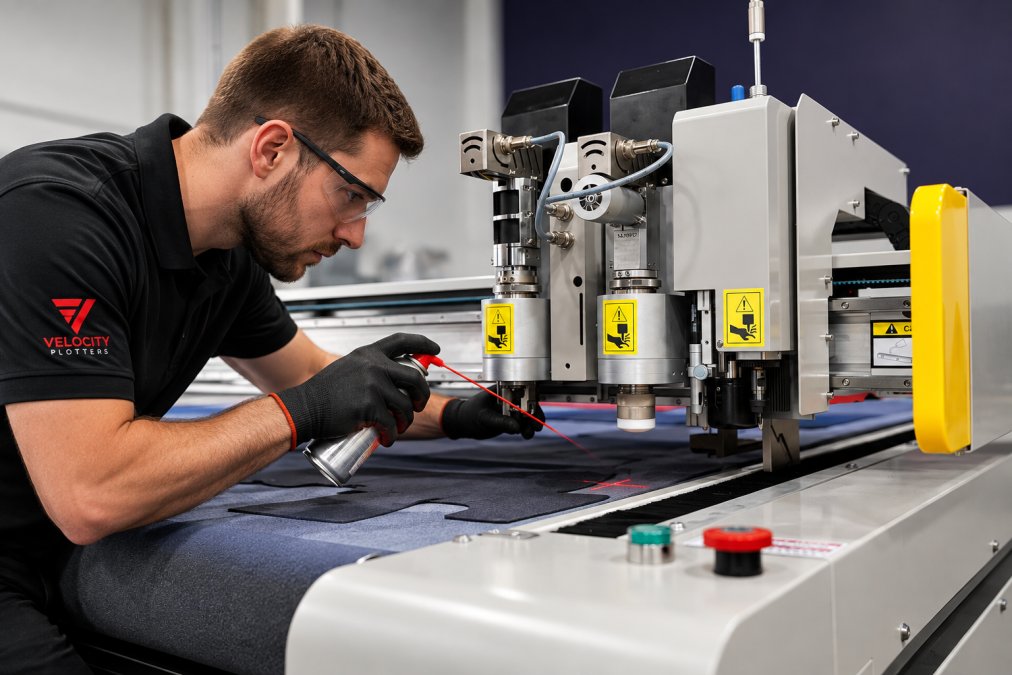
El mantenimiento regular evita la mayoría de los problemas de las máquinas de corte. Un programa de mantenimiento preventivo reduce los tiempos de inactividad y prolonga la vida útil del equipo.
Tareas de mantenimiento diarias y semanales
Daily (before production starts):
- Inspect the cutting area for debris or obstructions
- Check coolant level and top off if needed
- Verify spindle runs smoothly without unusual noise
- Confirm all work-holding clamps are secure
- Test the emergency stop button
Weekly (after heavy production days):
- Clean the cutting bed and remove accumulated chips
- Inspect tool holders for damage or wear
- Check all electrical connections for looseness
- Verify guide rails move freely without binding
- Document any unusual sounds or vibrations
Inspecciones mensuales y trimestrales
Mensual:
- Replace coolant if it shows signs of degradation (discoloration, odor, foam)
- Inspect spindle bearings for wear or noise
- Check pressure rollers for even contact
- Test all safety interlocks
- Review maintenance logs for trends
Cuartanal:
- Perform full machine calibration
- Inspect and clean air filters
- Check thermal management system operation
- Lubricate moving parts per manufacturer guidelines
- Replace worn consumables (seals, brushes, thermal paste)
Keep detailed records. A maintenance log shows when problems started and what fixes worked. This history helps you predict failures before they happen.
|
Maintenance Task |
Frecuencia |
Time Required |
Impact |
|---|---|---|---|
|
Debris removal and coolant check |
Diario |
10 minutes |
Prevents tool breakage and overheating |
|
Coolant replacement |
Mensual |
30 minutes |
Maintains surface finish quality |
|
Machine calibration |
Semanal |
20 minutes |
Ensures dimensional accuracy |
|
Spindle bearing inspection |
Cuartil anual |
45 minutes |
Detects wear before failure |
|
Full system check |
Cuartil anual |
2 hours |
Identifies emerging issues |
Cuando llamar a un servicio profesional de apoyo
Algunos problemas requieren conocimientos especializados. Saber cuándo llamar ahorra tiempo y evita daños.
Contact a service technician if:
- Electrical errors persist after basic troubleshooting
- Spindle bearings make grinding noises
- Calibration drifts despite weekly recalibration
- Vibration continues after parameter adjustment
- Hydraulic or pneumatic systems leak
- The machine shuts down unexpectedly
Professional technicians have diagnostic equipment and spare parts. They can identify problems that field troubleshooting can’t resolve. A service visit costs less than extended downtime.
Velocity Plotters provides world-class technical support to ensure cutting systems run reliably.
Troubleshooting cutting machine issues becomes routine once you understand the diagnostic process.
Preguntas Frecuentes
What are the most common causes of precision loss in industrial cutting machines?
Precision loss typically stems from tool wear, spindle runout, misalignment, or thermal growth. Tool geometry degradation reduces cutting edge sharpness, increasing feed rates and causing dimensional drift. Spindle runout—radial movement during rotation—compounds this. Temperature changes in the cutting zone and ambient conditions cause material and machine expansion. Loose fasteners, worn bearings, and calibration drift also contribute. Regular tool inspection, spindle maintenance, and environmental control mitigate these issues.
How often should industrial cutting machines undergo preventative maintenance?
Daily tasks include checking coolant levels, inspecting for blade obstruction, and verifying spindle operation. Weekly maintenance covers feed wheel and pressure roller inspection. Monthly checks address calibration verification and rigidity assessment. Quarterly inspections examine thermal stability and electrical connections. The frequency depends on machine type, cutting parameters, and material volume. High-speed CNC operations demand more frequent attention than low-speed equipment. Follow manufacturer guidelines and adjust based on downtime history.
What are the signs that a cutting blade or tool needs immediate replacement?
Replace tools when you observe chatter marks on the surface finish, increased cutting force, visible chipping or flaking on the cutting edge, or thermal discoloration. Burrs and rough edges indicate dulled geometry. If feed rate or spindle speed adjustments no longer improve surface quality, tool wear is likely severe. Inconsistent cut lengths across a batch signal tool degradation. Preventative replacement before catastrophic failure reduces scrap and machine stress. Track tool life by cut count or hours to establish replacement schedules.
How can software calibration errors impact cutting machine performance?
Calibration errors in CAM software or machine controllers cause dimensional inaccuracy, offset cuts, and material deformation. If programmed feed rates don’t match actual machine capability, tool breakage or poor surface finish results. Spindle speed mismatches create excessive heat or insufficient cutting force. Coordinate system errors lead to blade obstruction or off-pattern cuts. Thermal compensation algorithms must account for machine expansion during operation. Regular verification of software settings against machine specifications and test cuts prevents costly scrap and downtime.



 ES
ES  EN_US
EN_US