Physical Patterns. Digital Potential.
Bring your patterns into a connected digital workflow. Capture physical pieces, refine their geometry, and create editable files for compatible CAD, plotting, and cutting systems.
Keep the Knowledge. Expand the Possibilities.
Every approved pattern holds valuable work: a refined fit, a tested component, a design worth keeping. V-Shoot helps you bring that work into a digital environment where your team can edit, organize, and reuse it.
Preserve Your Pattern Library
Create digital copies of paper patterns and templates. Save approved versions with clear style names and revision dates, and back them up as part of your file-management process.
Reduce Repetitive Input
Capture several separate pieces in one image and let the software vectorize their shapes. Spend your attention reviewing the result and preparing the next stage of work.
Connect Your Production Tools
Export familiar industry file formats for compatible CAD systems. From there, prepare patterns for editing, grading, marker making, plotting, or automatic cutting.
From Your Board. Into Your Workflow.
Four practical steps connect your physical pattern to an editable file. Keep pattern review part of the process before releasing work to production.
Position Your Patterns
Arrange one or more pieces on the original V-Shoot board. Hold them flat with magnetic buttons, separate the outlines, and keep the reference circles visible.
Physical PatternsCapture the Image
Use a supported camera or capture device. The software reads the board's reference circles to correct image distortion and vectorize the visible pattern shapes.
Camera + Reference BoardReview and Refine
Inspect curves, corners, notches, and internal details. Refine vector lines, add or modify points and drill holes, and remove unwanted elements where needed.
Editable GeometryExport and Move Forward
Choose the file format your receiving software accepts. Verify units, scale, and a known dimension in CAD, then prepare the approved pattern for its next use.
CAD · Plot · CutCapture the Shape. Keep Control of the Detail.
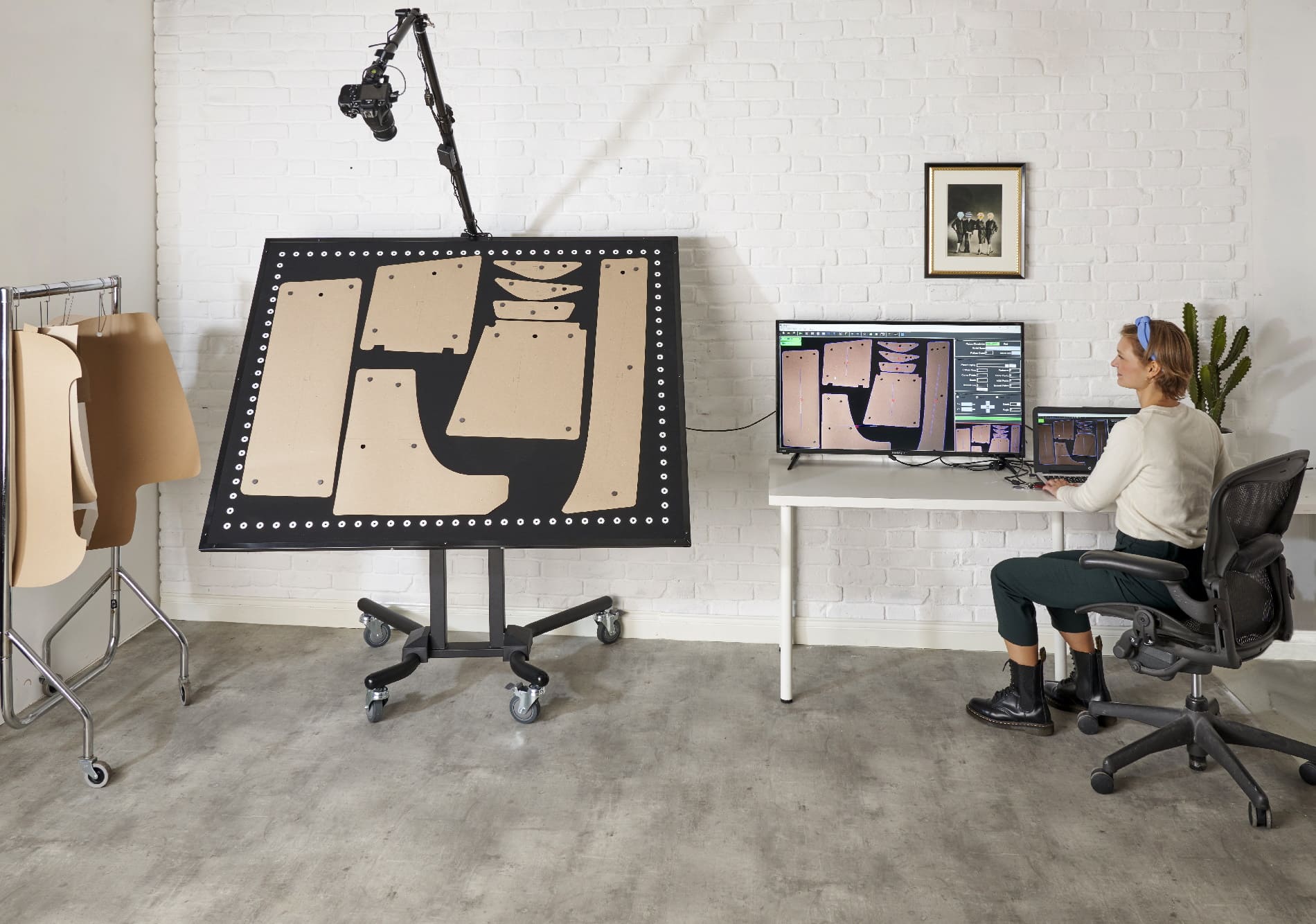
Plan a table, floor, wall, or angled installation around your space. Your quotation specifies the board, camera, computer, stand, and mounting.
Angled Board
An angled board with an overhead camera arm. Position your pieces, hold them flat with magnetic buttons, and capture them from above.
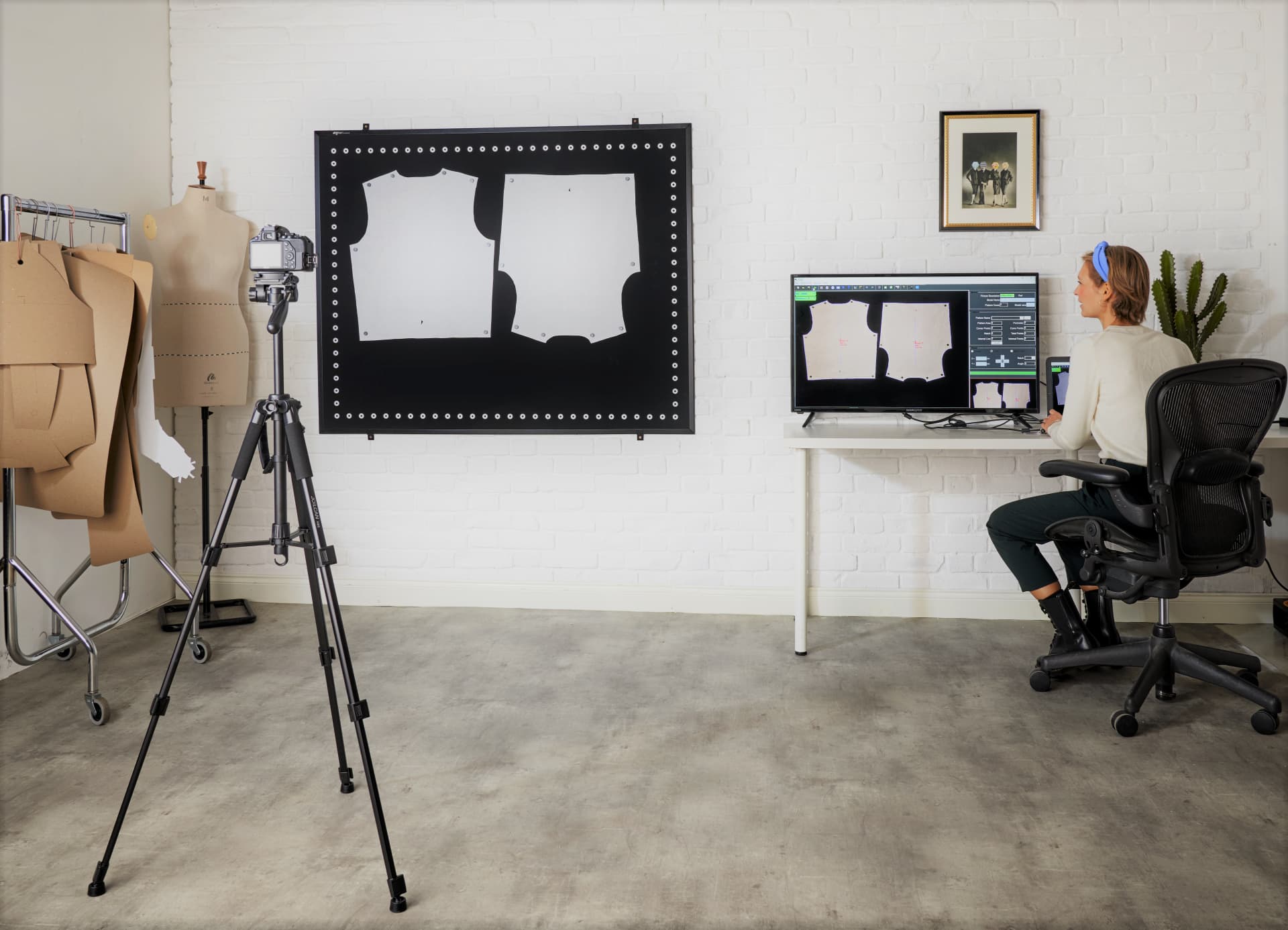
Wall Installation
A wall-mounted board with the camera on a tripod in front of it. Save floor space and keep the capture area always ready.
Illustrated configurations. Board, camera, computer, stand, and mounting inclusions are specified in your quotation.
One Digital Starting Point. More Ways to Work.
V-Shoot exports DXF, AAMA DXF, and PLT / HPGL. Select the format, units, and layer structure for the software that receives your patterns.
DXF
Move vector geometry into compatible CAD software for pattern editing and technical design. Verify import scale, curves, and required internal details.
AAMA DXF
Transfer structured pattern information to compatible apparel CAD workflows. Confirm your receiving system's conventions for pieces, notches, and layers.
PLT / HPGL
Prepare files for equipment and software that accept the selected plotting format. Cutting paths and tooling still need the correct downstream setup.
Compatible CAD platforms include
Don't see your CAD on the list? Just ask us and we'll confirm if it's compatible.
Compatibility depends on the software version and import settings. Ask us to verify a representative file in your exact workflow. Names shown identify third-party software; they do not imply endorsement.
Continue With Your Existing Cutting Table
Digitize the pattern, prepare it in compatible software, and plot it at the required scale. Use the plotted paper with your established manual cutting process.
Prepare for Automatic Cutting
Transfer approved patterns into compatible CAD/CAM software for nesting and cutting preparation. Your cutter's software handles its machine-specific output.
Start With Your Patterns. We'll Help Size the System.
The right V-Shoot configuration depends on your largest pieces, required accuracy, available space, and preferred capture method.
Standard Working-Area Options
Match the usable capture area to your physical patterns. These published options span the V-Shoot range; Velocity will identify the board, mounting, and camera arrangement for your chosen size.
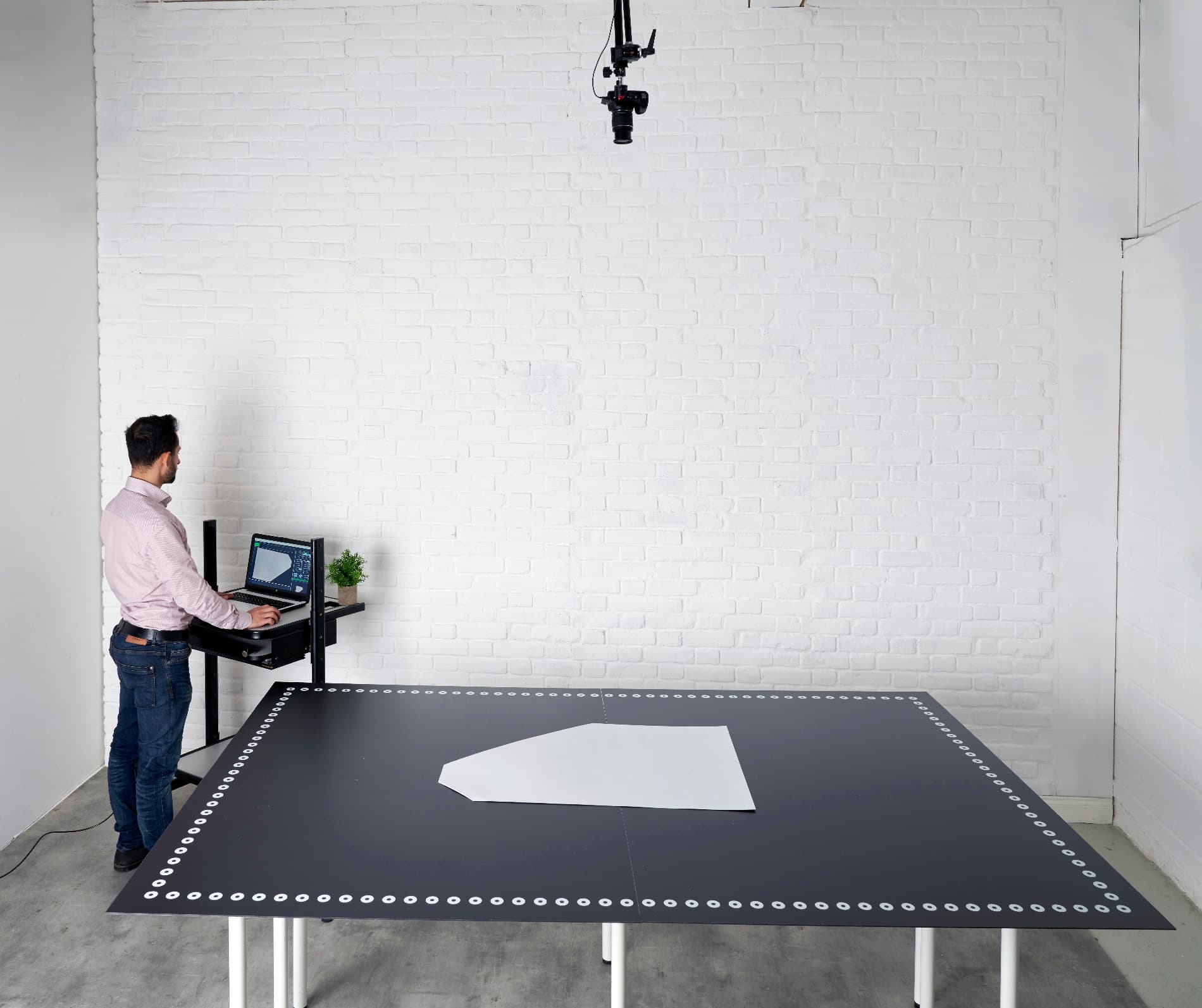 V-Shoot XL · Large Format
V-Shoot XL
For oversized templates and large pattern pieces. Plan a table, floor, wall, or angled installation around your material-handling space.
Common XL board dimensionsCustom boards are listed up to 177″ × 94″. Overall board dimensions and usable capture area are different measurements; confirm both in your quote.
How Large Is Your Biggest Pattern?
Enter one flat pattern's outer dimensions to see a starting working-area option.
Planning guide only. Allow room for positioning and multiple pieces. Velocity will confirm the usable area, board type, required accuracy, and camera placement for your installation.
V-Shoot Technical Specifications
Use these published details to begin your evaluation. Your written quotation confirms the selected hardware, software, installation, and service terms.
| Digitizing method | Camera-based image capture and automatic vectorization on the original magnetic reference board. |
|---|---|
| Multiple pieces | Digitize several separate pattern pieces from one capture. |
| Export formats | DXF, AAMA DXF, and PLT / HPGL. |
| Published accuracy | Within approximately 0.039″ (1 mm) for boards under 200 cm (approx. 79″); approximately 0.079″ (2 mm) for XL. Capture conditions, board configuration, and pattern review affect the result. |
| Smaller precision work | A 35″ × 24″ board is listed for higher-precision applications. Ask Velocity to evaluate your required tolerance. |
| Pattern materials | Paper, manila, cardboard, suitable vinyl templates, and some flat materials and fabrics. Confirm contrast, flatness, and handling for your samples. |
| Large patterns | XL installations and fractional digitizing for pieces captured in sections. |
| Camera configuration | Supported dedicated camera or compatible capture device; tethering and mounting requirements depend on the setup. |
| Computer platform | Windows native. macOS requires a compatible Windows virtual machine; confirm the proposed configuration. |
| Warranty & support | One-year parts warranty, subject to written terms. Remote technical support is available worldwide; the included term is confirmed in your quotation. |
*Published accuracy: approx. 1 mm for boards under 79″; approx. 2 mm for XL.
Bring Your Existing Work Into What Comes Next
From the sample room to specialized manufacturing, a digital pattern gives the next team a consistent starting point. Don't see your industry? Ask us.
Fashion, Apparel & Garment Manufacturing
Digitize paper, manila, and cardboard patterns for shirts, trousers, dresses, uniforms, and other garments. Refine curves, prepare grading or markers in your CAD, then plot full-size patterns or send them to an automatic fabric cutter.
Furniture & Upholstery
Turn paper, cardboard, and vinyl templates for cushion covers, seat panels, armrests, and backrests into vector files. Keep each model's pattern set digital to simplify replacement orders and custom modifications.
Automotive Interiors
Convert patterns for seat covers, door-panel coverings, and headliner sections into vector files. Review contours in CAD, then prepare cutting for leather, vinyl, carpeting, or technical textiles.
Footwear & Leather Goods
Digitize flat patterns for shoe uppers, linings, insoles, handbag panels, and wallets. Refine shapes and prepare production layouts for leather, synthetic leather, suede, or textile.
Sewn Products & Industrial Sewing
Convert patterns for bags, tents, awnings, tarps, and protective covers. A digital master makes it easier to reproduce customer-specific designs and prepare layouts for canvas, nylon, or coated fabrics.
Military, Defense & PPE
Digitize templates for uniforms, tactical equipment, protective garment panels, and equipment covers. Keep approved revisions organized and coordinate pattern changes across development and manufacturing.
Technical Textiles & Composites
Turn a paper, cardboard, or vinyl master into a vector file for components cut from fiberglass, carbon-fiber fabric, coated textile, or laminate. Plan material use before expensive materials are cut.
Marine & Aerospace
Digitize patterns for boat covers, marine seating, sail components, aircraft seat covers, and cabin textiles. Retain custom patterns and produce replacement components without repeating the original tracing.
Sports, Recreation & Performance Gear
Convert patterns for athletic apparel, wetsuits, outdoor equipment, and protective sports gear. Support prototype development and prepare cutting for neoprene, stretch fabrics, or technical mesh.
See Your Own Patterns. In Your Own Workflow.
A useful demonstration starts with the pieces you actually work with. Share these details so Velocity can recommend a configuration and discuss a representative capture.
Your Largest & Smallest Patterns
Include dimensions, materials, colors, and the details that matter most.
Your Receiving CAD System
Tell us the software name, version, file format, and next production step.
Your Space & Daily Workload
Share board-placement preferences, available space, and expected pattern volume.
Your Acceptance Criteria
Identify critical measurements and the tolerance you need to verify in CAD.
V-Shoot Questions. Answered.
What does the V-Shoot system include?
The essential components are the V-Shoot software and its reference board for camera capture. A supported camera, mounting equipment, computer, installation, and training depend on the package you select. Your written quotation identifies exactly what is included.
Can I digitize my existing paper and cardboard patterns?
Yes. V-Shoot works with paper, manila, cardboard, and suitable vinyl templates. Some flat materials and fabrics can also be digitized directly. Confirm contrast, flatness, and handling with your own samples.
Does V-Shoot need its original digitizing board?
Yes. Capture is done on the original V-Shoot magnetic reference board. Its printed reference circles let the software correct image distortion and account for the capture geometry.
Will the files work with my existing CAD system?
V-Shoot exports DXF, AAMA DXF, and PLT / HPGL. Published compatible platforms include Gerber, Lectra, Optitex, TUKAtech, VetiGraph, and AutoCAD. Compatibility depends on software version and import settings, so ask us to verify a representative file in your exact workflow.
Does it replace my grading, nesting, or cutting software?
No. V-Shoot creates the editable digital pattern. Grading, marker making, and nesting happen in your compatible CAD/CAM software, and your cutter's software handles its machine-specific output.
What if a pattern is larger than the capture area?
Choose a larger XL installation, or use fractional digitizing to capture the pattern in sections and combine the result. Your largest pieces help determine the right approach.
What accuracy should I expect?
Published accuracy is within approximately 0.039″ (1 mm) for boards under 200 cm (approx. 79″) and approximately 0.079″ (2 mm) for XL. Capture conditions, board configuration, and pattern review affect the result. A 35″ × 24″ board is listed for higher-precision applications.
Can I use my own camera or a Mac computer?
V-Shoot works with a supported dedicated camera or a compatible capture device. The software is Windows native; macOS requires a compatible Windows virtual machine. Velocity will confirm the proposed configuration.
How much does V-Shoot cost, and is financing available?
Pricing depends on the configuration, board size, and package you select. Request a demo and a Velocity specialist will prepare a written quotation. Financing is available through TimePayment, with flexible terms for qualified businesses. Explore equipment financing →
What installation, training, warranty, and support are available?
V-Shoot includes a one-year parts warranty, subject to written terms. Remote technical support is available anywhere in the world; the included term, along with installation and training, is confirmed in your quotation.
Need help with a specific pattern, CAD platform, or installation? Talk with a Velocity specialist: 833.275.6888

 EN_US
 ES